
A bit of context
We had experience with SIMRAD/B&G electronics and also Garmin from our previous boat: designing a new NMEA2000 (N2K) network is quite easy… even mixing brands is (usually) not really a problem (as long as all devices support N2K communication standard, the standard NMEA cables and connectors… and as long you don’t expect proprietary stuff to work across brands). Our SIMRAD instruments were using a Garmin backbone (mixed with the existing SimNet backbone, which is just a proprietary N2K backbone) and a B&G windvane, a VesperMarine AIS and a Garmin VHF.
I also had experience with getting in contact with the support teams from…
– Garmin (for a brand new bluetooth VHF handset not working – replaced very promptly)
– Navico (SIMRAD/B&G): in 2018, our newly installed instruments were expecting the “corrected” distance log to be stored by a chart-plotter on the network, but we don’t have one. In the old days, our instruments were relying on the autopilot computer (AC42) to store this corrected distance log. The new autopilot computer (NAC3) was no longer taking care of this. The Airmar speedometer does store a distance log, but not the “corrected” distance log. => No device would store the corrected distance log ! And finally, another minor issue was that the trip log would usually stop counting at exactly 4096 nm. All of these are minor nuisances, but getting support from Navico support has systematically been a pain.
– VesperMarine: we loved our XB-8000 AIS/NMEA gateway from the start. In 2016-2018, VesperMarine was releasing software upgrades regularly and adding new features with each release. I got a few bug reports fixed, including a transducer offset that was missing in the DPT sentence (over WiFi), useful for water depth. There were some more issues, but VesperMarine support team has always been responsive, and great new features like translating navigation data from WiFi to N2K have been added and were working flawlessly.
Getting new marine instruments
So, in early 2022, when we had to get new instruments, sensors and autopilot components in order to upgrade the 15 years old electronics on our new boat, we knew that Garmin and VesperMarine were the way to go. Garmin in not providing the fanciest instruments, but they have been widely used and tested. Simple, well tested and reliable instruments this is what we want on our boat.
As on our previous boat, I don’t want any chartplotter or Multi-Function Displays ; I want a computer.
VesperMarine had been working on a new device: the Cortex M1. It offers all the XB-8000 offered (AIS, NMEA Gateway) and it combines a VHF and an antenna splitter in one box (and more).
Navigation intruments
After reading the specification documentation of the devices I had in mind, I knew that we had to get an “N2K Network Updater” if we ever wanted to update the firmware on any of the N2K devices (from Garmin). It’s basically an SD card reader that plugs into the N2K backbone ; you use it when no other device on the network has an SD card port (no chartplotter). On the SD card, you copy a firmware bundle (that contains the updated for all Garmin devices) and all the Garmin devices on the network will get the update:
https://support.garmin.com/en-US/?faq=VNoBonZhES4ZqQLY5ABAEA
Easy. Wait… not so fast! Read carefully: The Network Updater must be at version 2.10 to update the auto pilot components. OK. Let’s update the Network Updater first (ours was running version 2.00). Oh oh: the firmware update for the Network Updater is not part of the bundle. It took 3 weeks for the Garmin Support teams (in France, Europe and the US) to get their hands on this particular firmware.
It’s been 3 long weeks (during which I had to explain over and over again that I just wanted to update the updater), but I have eventually been able to update all the devices. Plus, a couple of corrections were made to the above support article. Hopefully, the update for the Network Updater will be part of the next release of the bundle.

Here is the update file we got from Garmin (in a ZIP) – use it at your own risks, or get it from Garmin if you don’t feel like using my update file. Unpack the ZIP file to an empty SD card. Your SD card should only contain a Garmin folder with a gupdate.GCD file in it.
The checksum (sha256) for this file is:
502366e231bb6a13362eac4b53dacfecd59b88acf9a45d2241cf5513234996ef gupdate.GCD
(this is the update to version 2.10 for the Garmin NMEA2000 Network Updater)
Note that this firmware is now part of the MARINE DEVICE SOFTWARE UPDATES BUNDLE from Garmin.
VHF/AIS/Gateway
We had been very satisfied with our VesperMarine XB-8000 (AIS and NMEA gateway)… so when I noticed that we could get the new (at the time) Cortex M1 and H1P, we ordered them. Getting some electronic devices was a challenge lately (in early 2022), so we grabbed this opportunity. we also got a new VHF antenna set (aerial + cables + connectors), so that we could test the new rig at home and upgrade the aerial on the boat.

After a trouble-free update of all the Cortex components (M1, H1 and H1P), it was ready to go. Once the M1 was configured (no MMSI setup yet) and plugged into the N2K backbone, I fired up OpenCPN on the new navigation computer, added a NMEA0183 connection to the M1 (TCP port 39150, like on the XB-8000), created a route and activated it. The M1 should receive the NMEA0183 sentences over the WiFi, do its magic and send the route information to the N2K instuments (including the autopilot). No luck this time again: the Garmin autopilot showed “no active route”. This used to work flawlessly with the XB-8000… what’s happening then? I double checked the Cortex M1 specs and… oh sh*t : those NMEA0183 sentences are not translated by the Cortex M1.
Garmin support: NMEA 2000 PGNs and NMEA 0183 translations for Cortex®
So… no support for RMB, XTE or APB sentences. The navigation information sent from OpenCPN will never reach the autopilot. This is a real step back from the XB-8000. At this point, I got in contact with VesperMarine support team ; they confirmed after checking it out with the Product Manager that those sentences will be supported, just like on the XB-8000. I got the confirmation from Vesper Marine that this is all part of the upcoming releases.
BUT… in 2023, VesperMarine became part of Garmin ; development and support moved from VesperMarine teams to Garmin teams… and after a few firmware update in 2023, 2024 and a last update in 2025… nothing more is coming out of Garmin. Former products (including XB-8000) are no longer supported, and the Cortex line, while still on the marked and officially supported, does not seem to have a bright future.
It’s been a common practice by Garmin to buy other brands (Fusion, VesperMarine, Navionics, etc.) and leave them die slowly; too bad. In the end, because of this situation, we cannot recommend this product even though it offers features that no other VHF are capable of.
Computer
As much as we love the Raspberry Pi computers – we’ve had a bunch of Pi4, a CM4 and a PiZero W, zero 2W – a basic x86 computer as a base for the navigation computer is also a good alternative. Usually x86 computers come in a nicer package.
We previously had a small (sub 1 liter) computer with ethernet connector (internet connection to get GRIB files) and WiFi (to connect to the VesperMarine NMEA gateway), with a 22″ monitor at the chart table. Both running from our 12V batteries (technically, it is safer to power sensitive devices using a DC-DC regulator, in order to make sure you won’t fry them with some unexpected electrical surge).
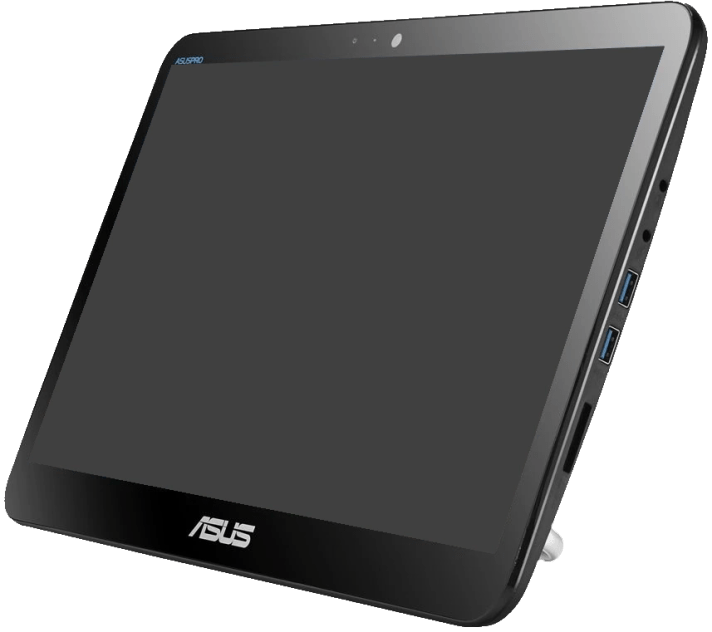
After some research, we found this ASUS V161 all-in-one computer (typically used in Point of Sale setups) that ticked all the boxes for our boat computer :
– compact screen size (15″ screen)
– screen only can be turn off and on by the push of a button!
– touch screen
– VESA mount on the back (75×75)
– x86 (64 bit) CPU
– WiFi and Ethernet connector
– 8 GB of RAM and SSD disk
– HDMI output
– 19V input (12V DC to 19V DC converters are common – laptop chargers for cars)

Of course, this computer is running Linux. This time, we moved to Arch Linux, and we are using OpenCPN. Those OpenCPN packages are directly built by the OpenCPN community and include all OpenCPN plugins. For such a critical piece of software, it is safer to ensure it’s working as intended by the developers. Also, Flatpak packages will work on any linux distribution, so we are not locked in.
Other devices
Basically, we have 3 independent networks for navigation:
- The main N2K for navigation (GPS, wind sensor, DST, autopilot, instruments)
- The VHF/AIS setup (with it’s own GPS)
- The electric propulsion N2K network (battery monitoring, motor display)
We can also extend the capabilities of those 3 systems by turning on extra devices :
- Our trusty Teltonika 4G router provides internet access and an WIFI and ethernet network that links many devices (4G router, NAS, computer, etc.)
- A Synology NAS (for storing music and films)
- A Fusion music player (FM and DAB+ radio, music from the NAS)
- A Home Assistant Green box that collects data from
- batteries monitors,
- batteries chargers and inverter,
- temperatures (fridge, freezer, propulsion battery locker),
- electric motor power,
- water leaks detectors
… all over Bluetooth. - N2K data from the instruments (via the Cortex gateway)
When the router is connected to the internet, it automatically creates a private subnetwork of our home network… allowing remote access to the boat’s network from anywhere in the world, in a secure way.
Conclusion
We are basically keeping the same setup we had built on our previous sail boat:
- Simple, reliable, efficient sensors and instruments plugged into the main N2K backbone
- A WiFi gateway (VesperMarine Cortex M1) to plug-in computers and handheld instruments (chart in the palm, depth information when dropping the anchor – or AIS target while napping during a passage)
- A VHF/AIS/Splitter combo so that you can see AIS SART targets from anywhere on the VHF’s handhelds screens (inside and on deck)
We still prefer using computers / handhelds over Multi-Function Displays (MFDs). MFDs are very expensive pieces of equipment that are difficult to upgrade – and bound to be obsolete after a few years.
For charts, we have Navionics on our smartphones (Wärtsilä iSailor has not been updated since 2019), and on the computer, the infamous CM93 worldwide-chart (that we use as a back-up plan) is now superseded by official o-charts.org charts.
Sadly, Garmin is most probably going to let the Cortex line die and we have lost hope to have OpenCPN (our chart plotter on the computer) control the autopilot by sending a route via the Cortex hub.
There are alternative gateways on the market:
– Orca’s CORE2 (it looks like it only works with Orca’s own application)
– DigitalYacht NAVLink2 (a true, bidirectional gateway between WIFI and N2K)
While Orca’s offer is packed with features, it has not been developed with interoperability in mind. Orca is not opening your boat network for more connectivity, it is mainly connecting your boat to Orca’s own applications, running on your phone or laptop (Mac only…)
The Digital Yacht gateway appears more open and has support for Signal K, an open standard for transporting boat data.


